Running organisations
I Replaced Notion With My Own AI CRM. Here's My Process.
I built my own AI CRM for €20. Sorry Notion Pro, sorry Hubspot. Here’s how you can do this in 4 steps.
Victoria Englert
|
|
10
min read
Before You Build Anything With AI, Do This First
I don't know about you, but I'm cheap.
So when I started my consulting practice a few months ago and needed a CRM, I wasn't about to drop €50+ a month on HubSpot or Pipedrive. I also wasn't about to use Notion's AI features that would lock me into their ecosystem at whatever price they decide to charge next year.
Instead, I built my own hyper-personalised AI CRM for €20 (the cost of my existing Claude Code subscription — monthly pricing, because commitment issues).
But this post isn't really about my CRM. It's about the process that happened before I wrote a single line of code. The part that most "build with AI" tutorials completely skip over.
Because here's the thing: we're in 2026, and AI has changed the calculation on custom tools. But most people still approach it backwards. They start with features ("I want kanban view! I want bulk editing! I want email notifications!") and end up with something that ticks boxes without actually serving their workflow.
I recorded a full walkthrough video showing exactly how the CRM works and how I built it. But if you want to understand the thinking behind it — the framework that makes the difference between "I vibe-coded something that broke in three weeks" and "I built a system that actually evolved with my business" — that's what we're covering here.
The Four-Step Framework
The process breaks down into four distinct steps:
Build a failure-by-design — a quick, imperfect first system whose job is to surface what you actually need
Define the problems — precisely, using emotional cues as signals
Define your decision criteria — your architectural brief before any feature discussion
Translate to features — with a PRD to anchor the build
Let me walk you through each one.
Step 1: Build a Failure-by-Design
When I started my consulting practice, I did what any reasonable, organised person would do: I set up a Notion database to track my outreach.
Within three weeks, I had completely outgrown it.
This is not a failure. In fact, I'd call it a "failure-by-design."
I firmly believe that the function of your first system is to tease out what you actually need. Which means you should set it up quickly, get it running, and pay attention to where it breaks down. You're not trying to build the perfect system on day one. You're trying to learn what the perfect system would need to be.
Once you've gathered insights from your rough prototype, you build on it in a test-learn-improve loop. But you can't learn from a system that doesn't exist yet. So get something running, even if it's imperfect. Especially if it's imperfect.
Step 2: Define the Problems Precisely
This sounds simple. It's harder than it looks.
Most people know what they don't want ("this tool is clunky," "this doesn't work well"). But articulating what they do want? That's where they get stuck.
So what were the specific problems with my Notion CRM?
Problem one: The database told me nothing about what to do next. Who should I follow up with? When? What should I say? It was a structured data dump, not an engine for my outreach. Useful for remembering interaction history, but annoying to have to separately do project management around it.
Problem two: I had no structured way to learn across rounds. Every conversation taught me something. I was writing it down, contact by contact, in my notes. But consolidating any of that? I could have sat down and manually reviewed everything — but realistically, as a solopreneur, you don't have time. That kind of meta-work is the first thing that gets skipped.
Problem three: Notion and Claude are friends, but not exactly best friends. The API is slow. There are limits to how much data Claude can pull in one query. Bottom line: I have FOMO (big time), and the tool wasn't letting me act on it.
When you're doing this exercise yourself, it's worth being very specific about how your current system is failing you. Not in abstract terms, but in concrete terms: What do you want to do that this tool won't let you do?
One trick that works: note down exactly when you feel annoyance, irritation, or any other low-grade frustration when using your tools. These emotional cues are signals. Stop and ask yourself: what about this is making me feel this way? What did I want to do but couldn't? What did I NOT want to do but have to?
Then write it down there and then.
Step 3: Define Decision Criteria
I know, I know — you're sitting there going "I've already got a list of 20 features I want built yesterday! What decision criteria?!"
Just hear me out.
Think of it like building a house. You wouldn't start by picking windows and shutters and a roof without first deciding what kind of house you're building, right? Without an overall vision to organise them, you end up with something that doesn't quite hold together. Individually fine components. You tick the boxes. But together? Eclectic.
Features work the same way. If you don't first define what your system needs to be, you end up with a tool that ticks boxes without actually serving your workflow.
Your decision criteria are the architectural brief. They define the overall shape of what you're building.
Here were mine:
My Five Decision Criteria
Criteria 1: The tool has to reflect how I actually work — and evolve with me.
When I started my outreach, I had no real methodology. I was just reaching out to people trying to get them to meet me for coffee. Then a friend said something that stopped me in my tracks: most people don't actually want to meet you for coffee unless they already have some connection to you.
That one observation completely reframed how I was thinking about outreach. I needed every round to have a purpose. A message designed around that goal. Which meant I needed campaigns, cohorts, messaging scripts. Structure I hadn't anticipated when I first set up my Notion database.
And here's the thing — I'm still learning. My process three months from now will probably look different again. So whatever I build has to be able to move with me. Not lock me into the assumptions I had in week one.
Criteria 2: Learning has to be built into the loop.
Most people treat reflection and learning as something you do after the work, if you have time. Which means it almost never happens systematically.
I wanted to design a system where the learning loop isn't an optional extra — it's baked in. Run a campaign. Capture what you learned. Update the messaging. Run the next campaign with better inputs. That cycle should be what the system is for, not something I schedule on my calendar and then skip.
Criteria 3: AI as the primary operator, not a bolt-on.
I'm a solopreneur. I don't have a team. AI is my team.
So the system needed to be designed from the ground up for AI to work with. Not "AI features" stuck onto an existing database. It needed a format and structure that Claude could actually read, reason about, and operate on intelligently.
AI-first systems optimise for parseable, unambiguous text. That meant the file format, the folder structure, the naming conventions — all of it had to be designed with Claude in mind.
Criteria 4: I own the data, and it has to go anywhere.
Here's something worth saying directly: Notion, HubSpot, ClickUp each has its own AI. I don't think it's primarily because they've decided AI is the best way to serve your workflow. It's because AI is the best way to keep you inside their ecosystem.
This space is moving so fast, and I want the flexibility to work with whichever model fits my needs best. I want to choose my own AI. I don't want to be locked into a SaaS company that increases its prices feature by feature, year by year.
That means I need to own my data outright — in a format any AI can access, on my own terms, without going through anyone's proprietary software format or API.
Criteria 5: The cost has to make sense — now and later.
I'm cheap. I've said this before and I'll keep saying it. Cost is a real consideration for any prudent solopreneur or small business owner.
Then there's the vibe coding angle. Platforms like Base44 will get you something working very quickly, but your backend is locked in their infrastructure forever. And the moment you decide on a web app, you'll have to start paying for hosting, database, etc.
I looked at what I was already paying for. I had Claude Code at €20 a month. I had web hosting I wasn't fully using. I had OneDrive for file sync. I wanted to make sure I fully utilised what I already pay for before evaluating what I could buy next.
Where Decision Criteria Come From
At this point you might be thinking: aren't some of these just a repackaging of your problems?
Partly, yes — my problems are one input. But things like cost efficiency, data ownership, AI portability? Those weren't part of my initial problem set. They came from somewhere else.
Your decision criteria come from multiple sources:
Your problems (the immediate pain points)
Your values (what you care about beyond just "working")
Your constraints (budget, time, technical skills)
Your strategy (where you're heading, not just where you are)
The key is to limit yourself to 3-5 criteria, maximum 7. Any more than that and you're not making decisions — you're just listing things you want. Decision criteria are meant to help you make trade-offs. If everything is equally important, nothing is.
Step 4: Translate to Features (Starting With a PRD)
Only after I had my decision criteria clear did I start thinking about features.
And I didn't just make a list. I wrote a PRD — a Product Requirements Document.
The PRD forced me to think through:
What features the system needed
Why each feature mattered (tied back to my criteria)
What "done" looked like
What the user experience should feel like
Writing the PRD took about two hours. Building the actual CRM with Claude Code took another three or four. But those two hours of planning saved me from building the wrong thing, then rebuilding it, then rebuilding it again.
If you want to see the actual PRD and how it translated into the final system, please watch the video above. I also demo the full CRM in action — showing how I prep for calls, track learnings across cohorts, and let Claude help me refine my messaging with each round of outreach.
What I Actually Built
The CRM runs locally on my machine. Files sync via OneDrive. Claude Code interacts with it directly. Total monthly cost: €20 (just my Claude Code subscription, which I was already paying for), plus 3 days of actual vibe-coding.
My current outreach campaign workflow looks like this:
I create a campaign (e.g., "Outreach to sustainability consultants")
I create a cohort within that campaign (e.g., "Round 1 — January 2026")
I add contacts to the cohort
I draft outreach messages, using Claude to help
After each call, I log what I learned
The system consolidates learnings across all contacts in the cohort
At the end of the round, Claude helps me review what landed, what didn't, and what to test next
I update my messaging playbook
I run the next cohort with better inputs
It's a self-perpetuating learning loop. And it works because I designed it that way before I started building.
The video shows all of this in detail — including how the file structure works, how Claude interacts with it, and how the cohort review process actually surfaces patterns I would have missed otherwise.
If you want to see it in action, the video is embedded above, or watch the full walkthrough here.
Your Turn
If you want to use this CRM yourself, I'm giving it away for free. Download link here.
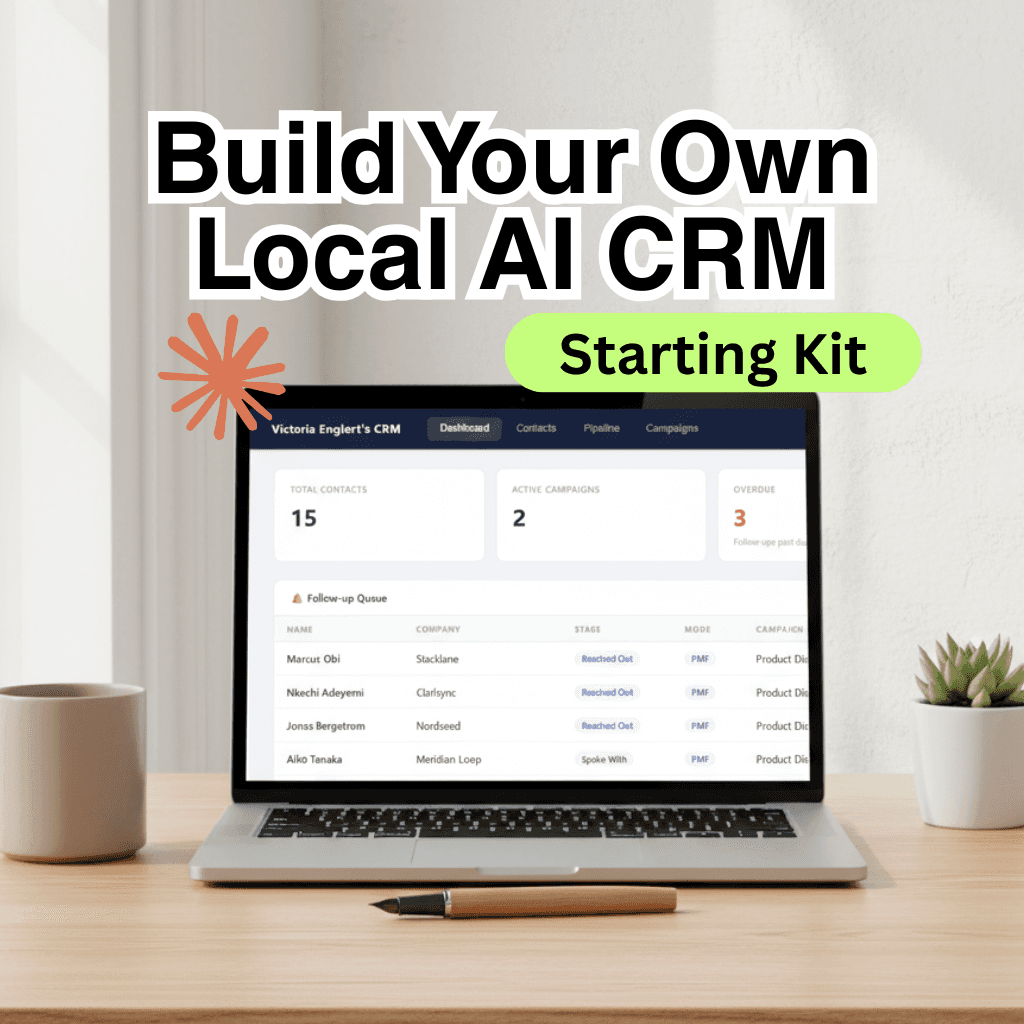
You'll need to install Node.js (it's free, takes five minutes). Then unzip the folder, double-click start.bat, and you're running. Fire up Claude Code, adapt it to whatever you need.
If you take it somewhere interesting, drop me a message. I'd love to know how you've changed it around.
But here's the thing: this post isn't really about my CRM. It's about the thinking process that happened before the vibe coding. The four-step framework:
Build a failure-by-design
Define the problems precisely
Define your decision criteria
Translate to features with a PRD
If you follow this framework, I'm almost certain you'll have an easier time and better results than simply starting with a feature list.
The mistake isn't choosing to build with AI or not. The mistake is building without first understanding what you're actually trying to solve — and what kind of solution would actually serve you three months from now, not just today.

Thank you for reading!
If you enjoyed the article and would like to buy me a nice cup of cappucino,
👉 support me on Ko-fi
How to export and self-host your Webstudio site with a Wordpress headless CMS
Should you use Webstudio? Confessions from a Webflow junkie
Why New Year’s Resolutions Rarely Work — and What Does Instead
How to Register as an Einzelnunternehmer in Germany: A Practical Guide for Solopreneurs / Freelancers
Useful Resources for Aspiring Pigeon Rescuers
What “Ask and It Is Given” Taught Me About Emotional Regulation
Trapped in your own business
I Replaced Notion With My Own AI CRM. Here's My Process.
“Help! Why can’t I get anything done?” — A letter from a small business owner
The REAL Reasons Your Project Management Tool Failed