Running organisations
“Help! Why can’t I get anything done?” — A letter from a small business owner
A reader complains that he can’t get anything done and asked me to recommend a tool. Turns out a new tool won’t solve his problems.
Victoria Englert
|
|
8
min read
Why Your To-Do List Is Making You Feel Like a Failure (And How to Fix It)
A small business owner reached out and asked me to recommend a task management tool. But the more he explained his situation, the more I realised: a new tool wouldn't help him. Not even a little.
His name is Kenny. He runs an automotive repair shop and does some hobby farming on the side. He's been making lists, refining lists, creating sub-lists of lists — and almost nothing ever gets checked off. He described it like Canada thistle: every time you cut one task down, a dozen more spring up in its place.
He wanted to know if ClickUp would fix it.
Spoiler: the tool is not the answer. And if you've ever felt the same way Kenny does — drowning in tasks, paralysed by your own list, wondering what's wrong with you — then this post is for you.
I recorded the full walkthrough, including a live demo of building Kenny's system from scratch in ClickUp. Watch it here:
Or read on to see how I diagnose the underlying issues first, and what my proposal for Kenny is.
The real problem: three doom loops wrapped in one
Here's something worth saying directly: 80% of the time, the tool is not the answer. Tools don't fail people — systems do.
If changing the tool isn't accompanied by changing attitude and behaviour, the new tool will collect the same dust as the old one. That's why Kenny's Google Doc failed him. That's why Todoist failed him. Not because those are bad tools (ok I mean Google Doc really isn’t ideal for project management), but because the underlying patterns never changed.
When I looked at Kenny's letter, and then at his actual Todoist and planning documents, I could see he wasn't caught in one doom loop — he was caught in three, all running simultaneously and reinforcing each other.
The Capacity Loop
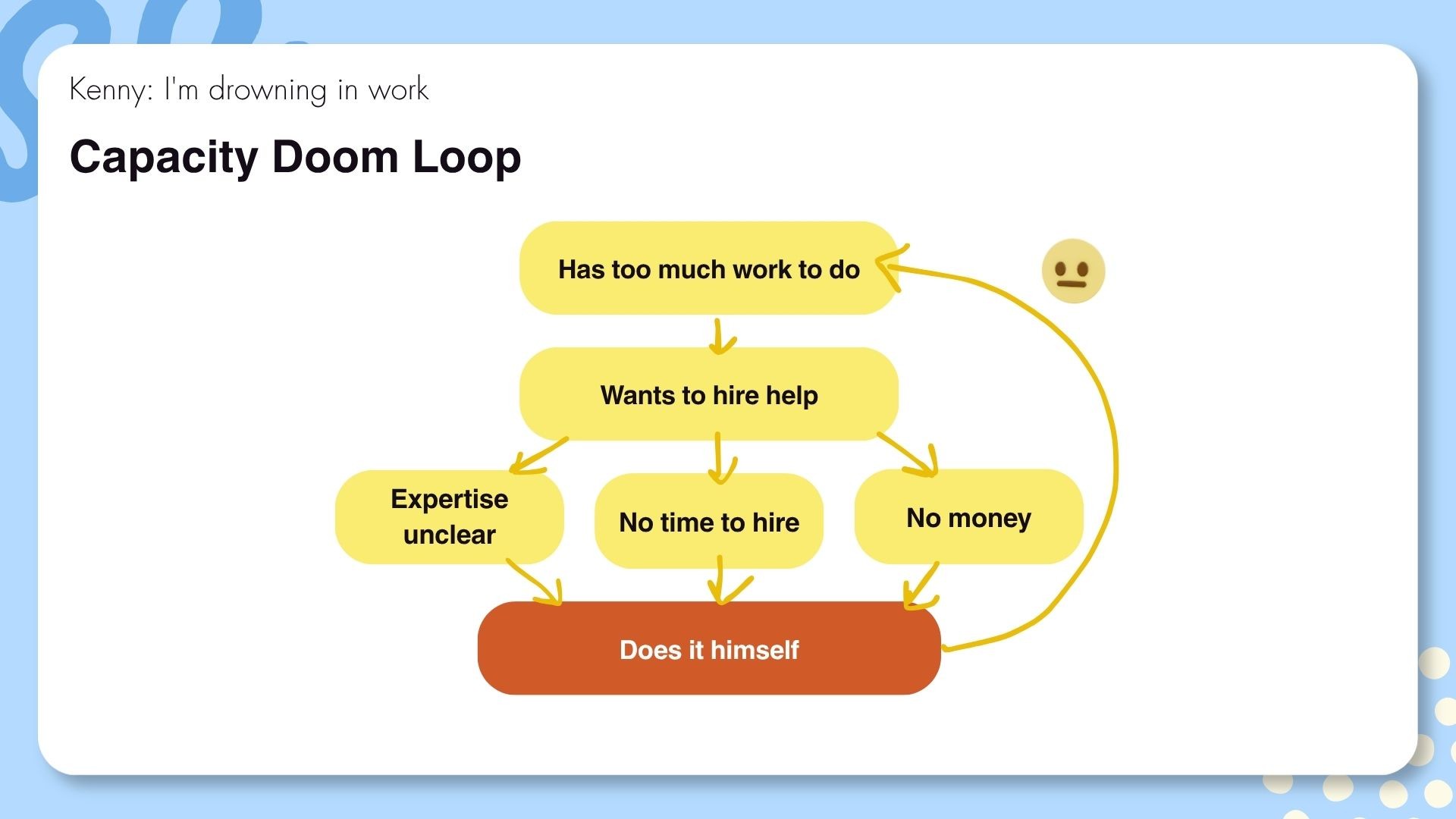
Kenny believes he has a capacity problem: not enough money, not enough time, not enough help. He wants to hire, but can't afford to, can't find good people, and doesn't have time to onboard anyone anyway. So he does everything himself. Which means too much work. Which brings him back to wanting to hire.
Trapped.
But here's what's actually happening. Imagine a fairy godmother appears and says, "Kenny, I'll give you exactly the money you need to get everything done. How much?" He can't answer. Not because he's bad at estimating — because he has no clear picture of what actually needs doing, who could do it, or what each thing costs.
That's not a money problem. That's a visibility problem. He's making worst-case assumptions because the scope is completely unclear.
The Structural Loop
Kenny has also been making lists. They "just don't work." So I asked to see them.
What I found weren't tasks. It’s an anxiety dump.
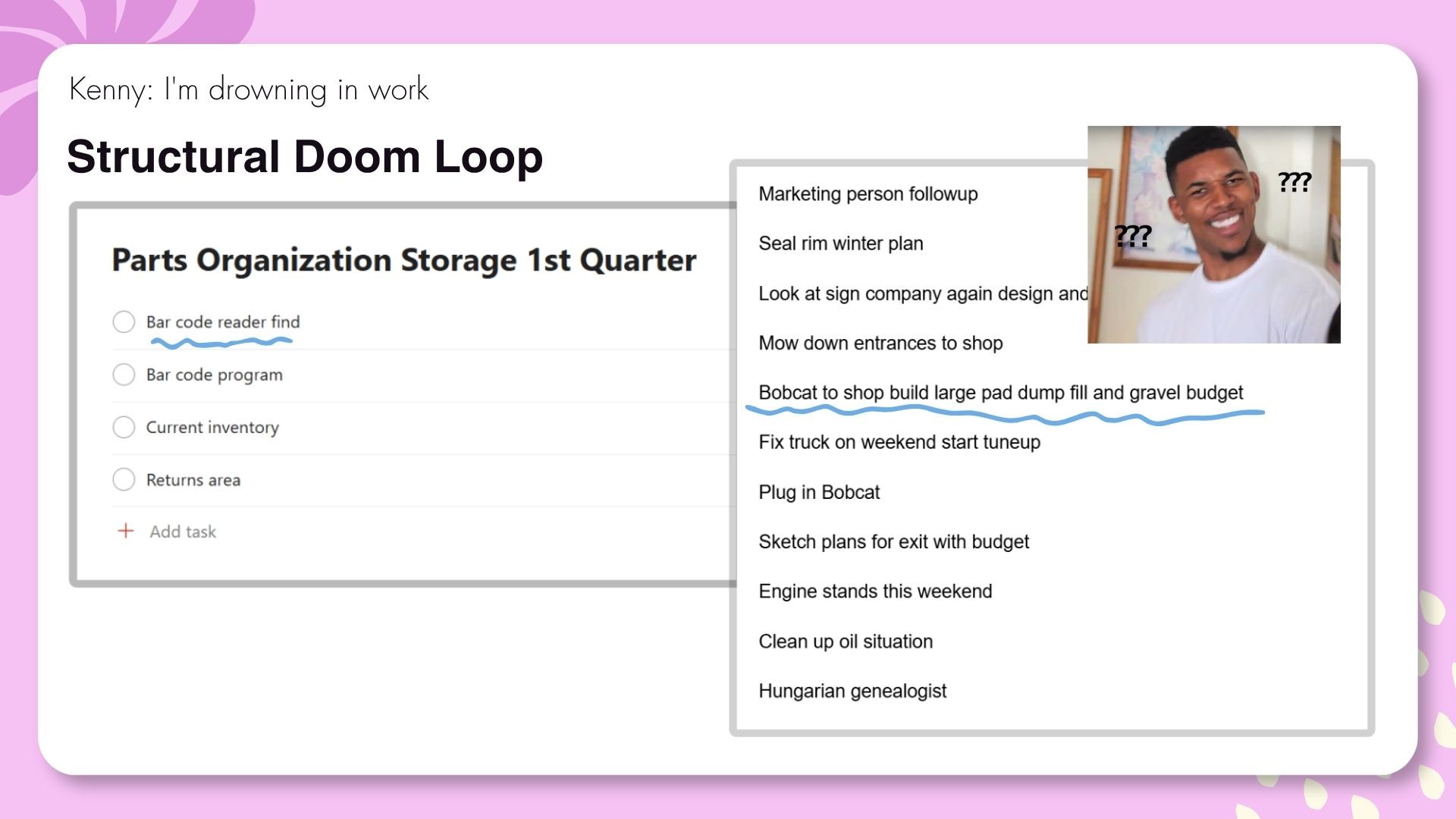
"Barcode reader find." What does that mean? Buy one? Research options? Return a broken one?
"Bobcat to shop build large pad dump fill and gravel budget." I had to text Kenny directly to figure out this was about creating a new carpark at his workshop. It turned out to be seven separate tasks, not one.
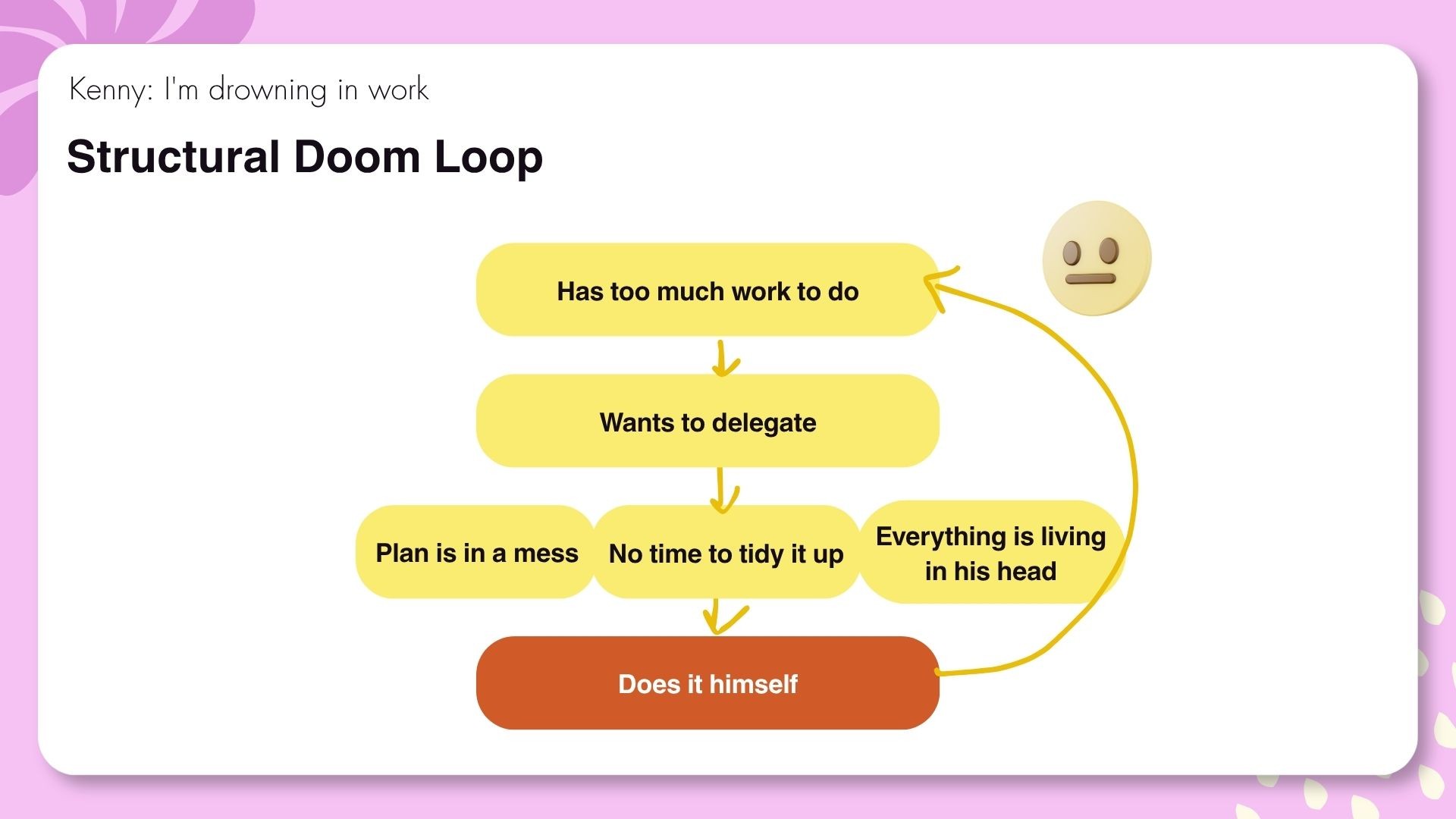
These entries gave Kenny temporary relief — externalising the noise is always better than keeping it entirely in your head — but they can't actually be executed. They're a mix of categories, intentions, and vague problem spaces that only make sense if you're already Kenny. Nobody else could pick these up and run with them. Which means Kenny can't delegate. And since Kenny can't delegate, he does everything himself. Which means too much work. Which means no time to organise his tasks properly.
Trapped again.
The Emotional Loop
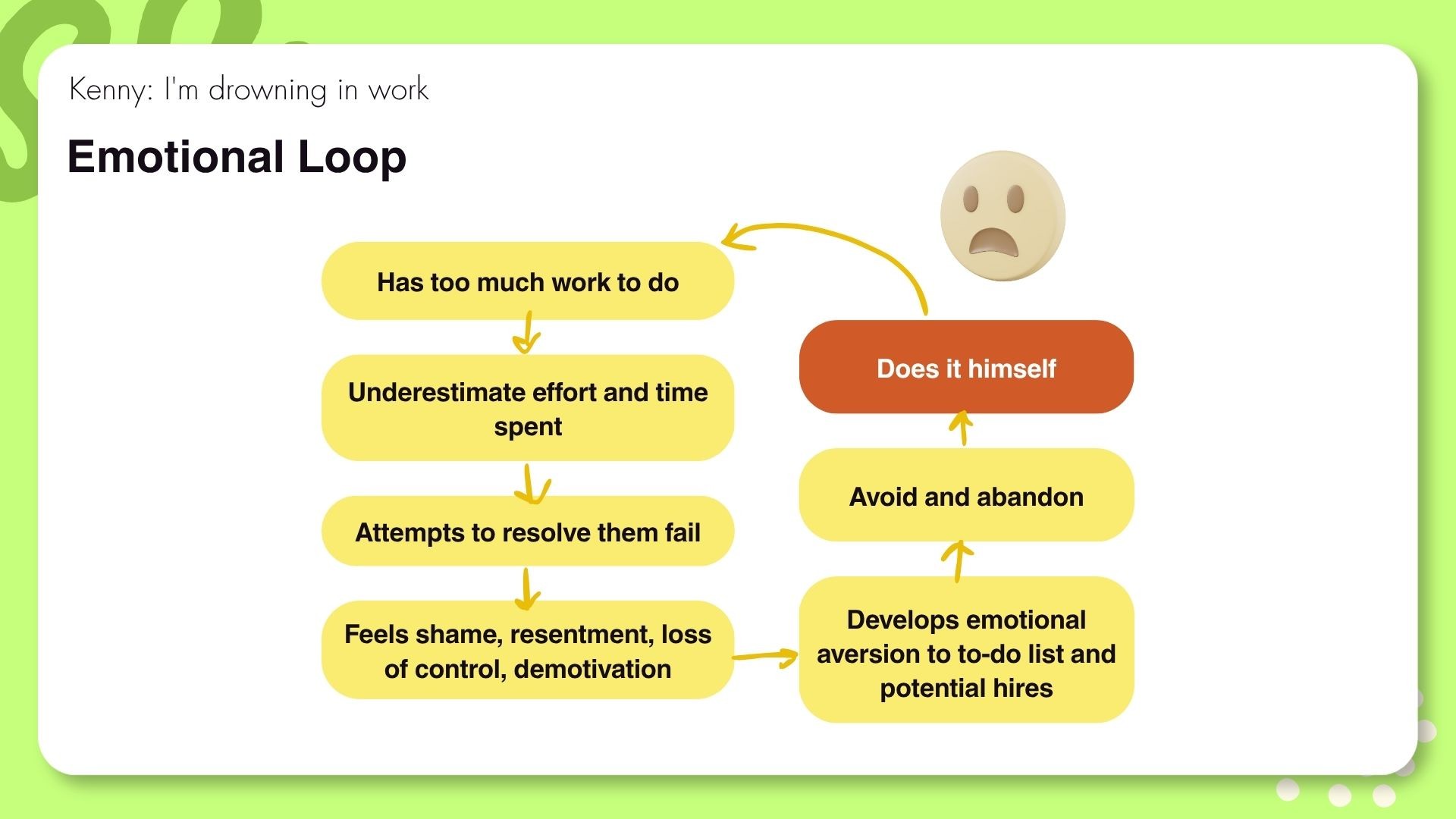
This is the one most people miss — and the one I think hits hardest.
Kenny is time-blind. He underestimates how long things take, commits to unrealistic timelines, then fails to meet them. Not because he's lazy. Because the commitments were never realistic to begin with.
But Kenny doesn't see it that way. Every time he fails to complete what he planned, he collects it as evidence. I'm bad at this. I can't follow through. Planning doesn't work for me.
That leads to shame, resentment, and — critically — emotional aversion to the to-do list itself. The list stops being a tool and starts being a record of his failures. He avoids it. Which means nothing gets done. Which means too much work.
Trapped a third time.
How they make each other worse
These loops don't just run in parallel — they amplify each other. I think of it like a warehouse. Your capacity is how much you can store and how stable the structure is. Emotional load is like sandbags piled inside: they make the overall structure less stable AND block access to what's already there.
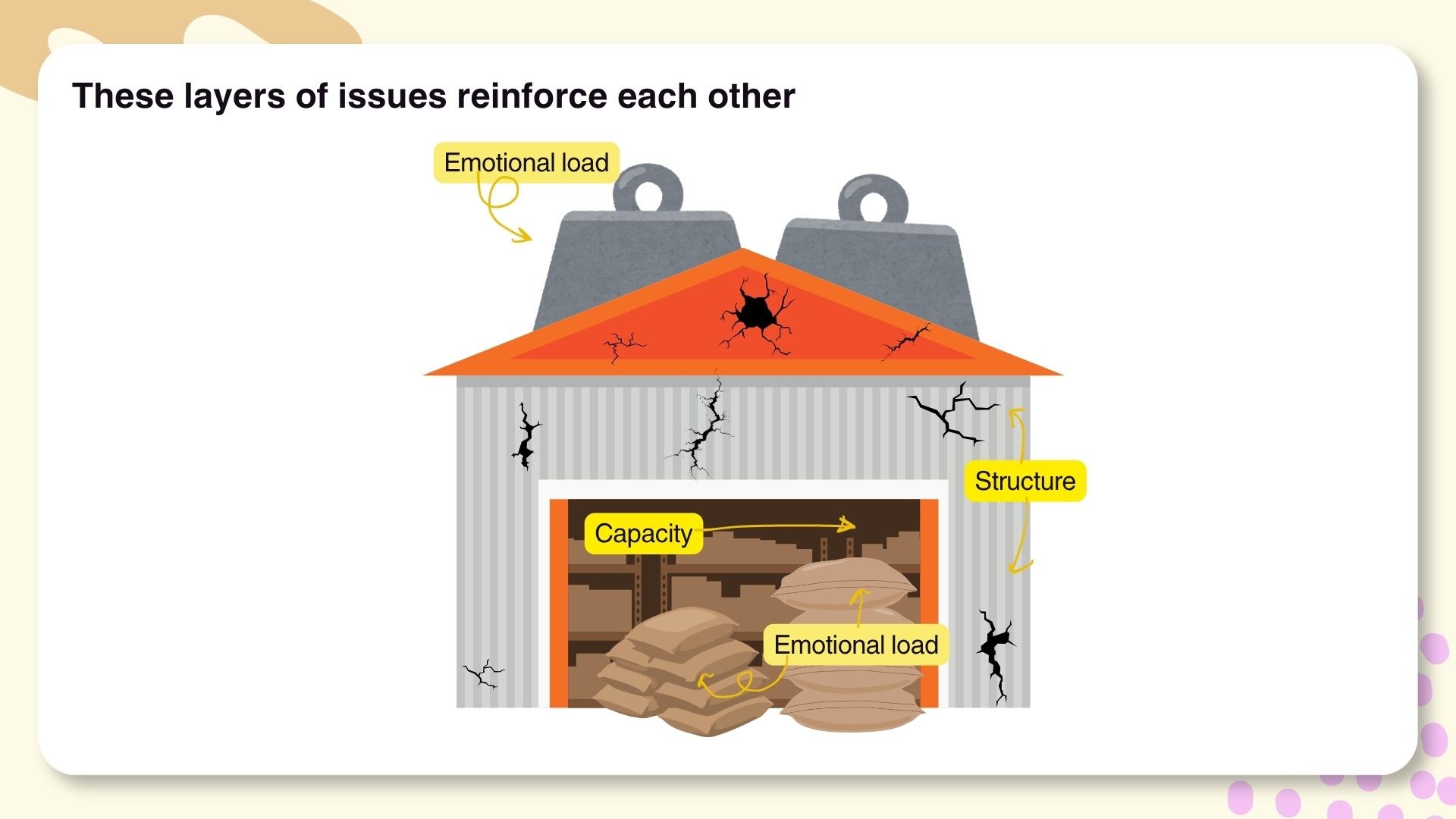
If you want to expand the warehouse, you need to remove the emotional weight and create visibility. And — here's the good news — you can do both at the same time.
The Doom Loop Breaker: three rules, two goals
I built Kenny what I'm calling the Doom Loop Breaker. It's a three-rule system, and it's designed to achieve exactly two things.
Goal 1: Create visibility. Kenny should be able to answer "what do I do next?" in under five seconds. Tasks should be in one place. They should be clear enough that someone other than Kenny could understand them.
Goal 2: Create positive reinforcement. Kenny needs to see his progress. Every completion needs to register as a win — we're literally designing for dopamine here. Not to be gimmicky, but because his brain has been fixated on what's not done for so long that it's forgotten what forward movement feels like.
Everything else — delegation, time management, cash flow planning — is downstream from these two. Fix visibility and momentum first, and the rest becomes solvable.
Here are the three rules.
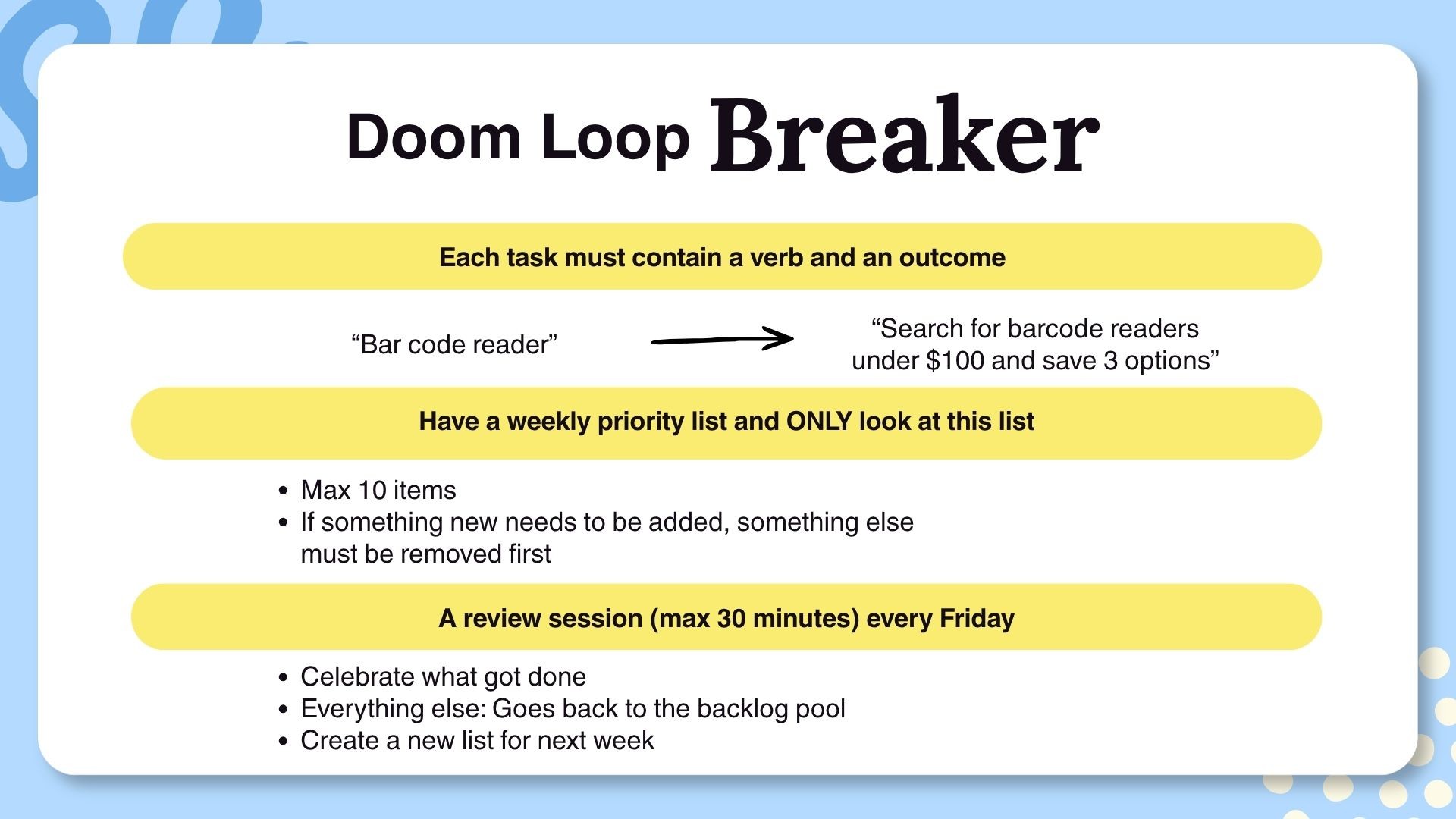
Rule 1: Every task must contain one action and one outcome
Kenny doesn't have a problem writing things down. He has a problem writing things down in a way that can actually be executed.
"Barcode reader" is not a task. "Research barcode reader options under $100" is a task. "Decide which barcode reader to buy" is a task. "Purchase the chosen barcode reader" is a task.
Those are three tasks, not one. And each one has a clear action, a clear outcome, and can be completed in a single sitting.
The goal is to make "action and outcome" into muscle memory. If you can't reflexively break a task into a single completable unit, it will stay as a looming fog — something your brain knows isn't really "one thing" even while your list is telling you it is. That cognitive dissonance is what creates paralysis. Remove it, and you can start.
"Bobcat to shop build large pad dump fill and gravel budget" became seven tasks:
Transport the bobcat to the workshop
Measure the land dedicated to the new carpark
Calculate the amount of gravel needed
Call the materials supplier to get a quote
Order the gravel
Lay the gravel
Return the bobcat to the farm
Kenny thought he had one task. He had seven. No wonder he couldn't start.
Rule 2: A weekly Priority List with a maximum of 10 items — and only look at this list
Brain dumps feel productive. And sure, getting things out of your head and into a document is better than keeping them in your head. But staring at 47 tasks with no obvious entry point is its own kind of paralysis.
The Priority List is the fix. Pick 5–10 tasks for the week, put them in one list, and close the backlog. Everything else can wait. You'll come back to it on Friday.
I know the immediate objection: Victoria, I have daily fires. Weekly planning is useless for me.
Fires are tasks too. If you know you'll have two or three emergencies a week, don't plan ten tasks — plan five. Leave room for reality. The constraint isn't there to stress you out. It's there to protect your sanity and give you an honest picture of what you can actually accomplish.
For Kenny's first week, I gave him seven tasks. Not ten. He's got customer crises landing daily, so we built in buffer from the start.
Rule 3: One review session every Friday
Every Friday, you sit down with a cup of something good, open your Priority List, and do two things.
First: celebrate whatever got done. And I mean physically. Pat yourself on the back. Fist pump. Do a little dance. I don't care what form it takes — your body needs to mark the win. Kenny's mind has been cataloguing failures for months. We're retraining it that progress is real.
Second: clear the incomplete tasks. No guilt. No rollover. No "I failed at these four things." Send them back to the backlog. If they matter, they'll make it onto next week's list. If something more urgent shows up, they'll wait their turn. That's fine. That's the system working.
Then pick your next 5–10 tasks from the backlog and do it all again.
What changes — and what doesn't
Kenny's Monday morning used to look like this: open the document, scroll through 47 vague tasks, feel immediately overwhelmed, close the document, spend the day putting out fires, open the list at the end of the day and find nothing checked off. Feel like a failure. Repeat.
Kenny's Monday morning now looks like this: open ClickUp, see seven tasks, look at the top one — "Move bobcat from farm to shop — check battery first" — do it, check it off. 1/7 complete. Feel like he's winning. Come back tomorrow.
What changed? Not the workload. Not the money. Not the hours in the day.
What changed was what Kenny could see, and how he felt about it.
Same amount of work completed — but one system showed 44 undone things, and the other shows 3 done things out of 7. That's not a small difference. That's everything.
I walk through the full setup in the Youtube video embedded above, including how I rewrote Kenny's actual tasks, how ClickUp's Priority List works in practice, and what the Friday review looks like when you're running it live. It's much easier to see than to describe.
Your turn
This post isn't really about Kenny, or about ClickUp, or even about to-do lists.
It's about the fact that most productivity problems aren't execution problems — they're visibility and momentum problems. And you can't solve a visibility problem by adding more features to your task manager.
Here's your homework: pick one thing from your list right now. Rewrite it with a single action and a single outcome. Do it. Check it off.
One task. One win. One step toward breaking your own doom loops.
And if Kenny's situation sounded familiar, drop me a note. What's the incomprehensible thing that's been sitting on your list for months?

Thank you for reading!
If you enjoyed the article and would like to buy me a nice cup of cappucino,
👉 support me on Ko-fi
How to export and self-host your Webstudio site with a Wordpress headless CMS
Should you use Webstudio? Confessions from a Webflow junkie
Why New Year’s Resolutions Rarely Work — and What Does Instead
How to Register as an Einzelnunternehmer in Germany: A Practical Guide for Solopreneurs / Freelancers
Useful Resources for Aspiring Pigeon Rescuers
What “Ask and It Is Given” Taught Me About Emotional Regulation
Trapped in your own business
I Replaced Notion With My Own AI CRM. Here's My Process.
“Help! Why can’t I get anything done?” — A letter from a small business owner
The REAL Reasons Your Project Management Tool Failed